
Priority access to the system on the Plus Subscription ($20/month) means fewer issues with logging in to their massively oversubscribed service, with the bonus of 25 queries to the GPT-4 model per 3-hour period.
It has felt like I can dream about building software again with the brakes taken off since the accelerating effect on a standard development workflow feels like nothing that has come before. It is clear that coding workflows can be accelerated using the power of AI through ChatGPT, especially to rapidly prototype projects or ideate solutions to problems within existing projects.
The blossoming relationship I’ve formed with my new work partner has had its quirks, and I’ve captured some of these pitfalls below to share my experience with others following in my footsteps.
Rapid Prototyping with ChatGPT
ChatGPT can be used as an intelligent code completion tool, suggesting code snippets and solutions as a developer works on a project. By integrating ChatGPT into your coding environment, you can speed up the development process while also benefiting from the AI’s vast knowledge of programming languages, libraries, and best practices.
If you use the Unofficial ChatGPT desktop app, you can directly sync prompt snippets into the configuration, then use /command syntax to autocomplete suggested prompt starters. This was useful for specific language setup contexts (E.g “Act as a developer that is building a typescript-based ReactJS web app with SCSS based on best practices. Prefer readability over conciseness. If you are unsure about the best approach, provide them as options”)
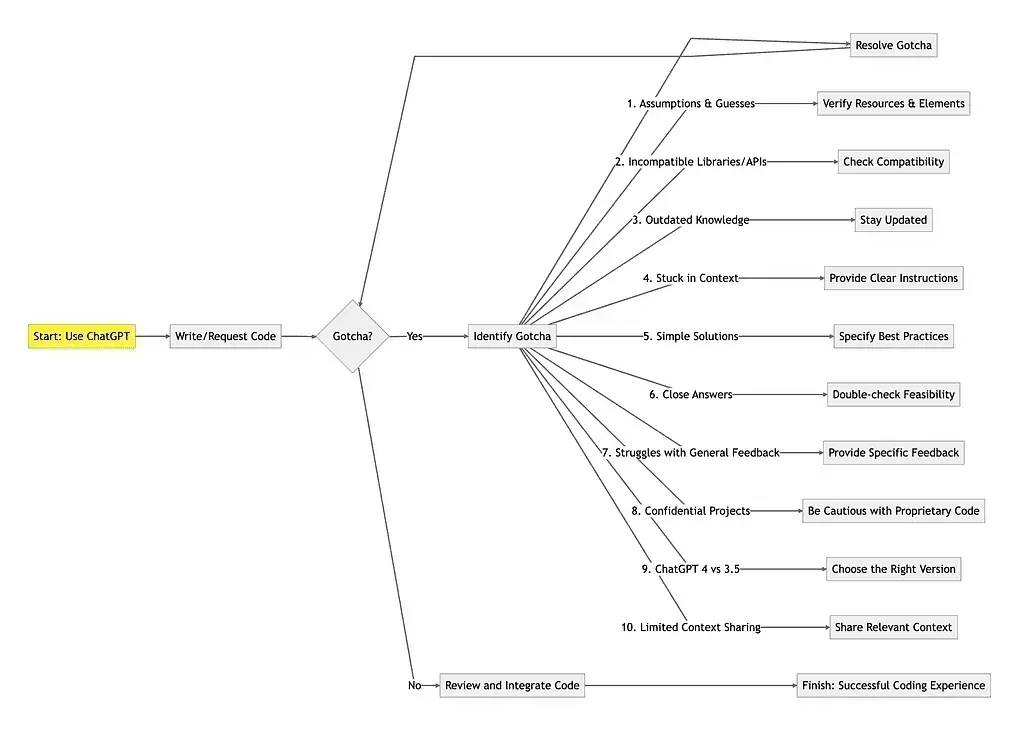
10 Gotchas to Keep in Mind
- ChatGPT may make assumptions and guesses without seeking clarification.
When ChatGPT encounters ambiguous input or lacks contextual information, it may make assumptions rather than ask for clarification. This can lead to incorrect code or references to non-existent resources. Be prepared to double-check the AI’s suggestions to avoid potential errors.
2. The AI can import incompatible libraries and fabricate APIs.
ChatGPT might suggest importing libraries that are incompatible with your project or creating APIs that don’t exist. To avoid compatibility issues or broken code, make sure you verify suggested libraries and APIs before integrating them into your project.
3. It is limited to 2021 knowledge, so some practices and versions may be outdated.
As ChatGPT’s knowledge is limited to information available up until 2021, it may suggest outdated best practices or outdated library versions. Stay informed about current best practices and dependencies to avoid using outdated information.
4. ChatGPT may become stuck in a specific context, making it difficult to adjust the solution.
When iterating on a solution, ChatGPT might become fixated on a specific context, making it challenging to change the direction of the solution. In these cases, providing explicit instructions and feedback can help guide the AI toward a more suitable approach.
5. The AI tends to opt for simple solutions over best practices.
ChatGPT often leans toward simple solutions, even when adding layers of abstraction or following best practices would lead to better code readability and maintainability. Make sure to specify your preference for best practices when seeking the AI’s assistance.
6. When faced with impossible tasks, ChatGPT may provide a close answer instead of admitting impossibility.
If ChatGPT encounters an impossible task or lacks sufficient data, it may still provide an answer that is close to the desired output. In such cases, it is crucial to double-check the AI’s suggestions to ensure their feasibility and accuracy.
7. It may struggle to identify and correct errors based on general feedback.
ChatGPT can find it challenging to pinpoint which part of the code needs adjustment based on general feedback. To improve the AI’s understanding of the issue, be specific when providing feedback and iterate on the solution until it meets your requirements.
8. Be cautious with confidential projects, as sharing code with ChatGPT may lead to licensing and ownership issues.
Sharing code with ChatGPT may result in complex licensing and ownership challenges, and the AI might use the code to train new versions of the model. Exercise caution when working with confidential or proprietary projects.
9. ChatGPT 4 is more adept at solving complex queries than 3.5 but is slower.
While ChatGPT 4 offers better performance in solving complex queries, it is slower than version 3.5. Keep this trade-off in mind when selecting the appropriate version of ChatGPT for your project.
10. Keep in mind, ChatGPT can’t see your whole project, so you might need to give it a bit more context to get the best suggestions.
With ChatGPT, you can only share a limited amount of context, which might not encompass your entire project. This can hinder the AI’s ability to provide accurate and relevant suggestions. It is crucial to determine the most relevant context to share in order to support the AI’s problem-solving capabilities.
The Future of ChatGPT
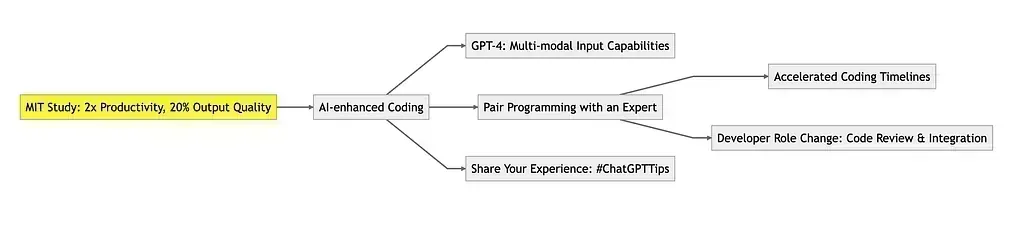
Despite the mentioned gotchas, a recent MIT study showed that integrating ChatGPT in coding workflows doubles the productivity and improves output quality by 20% (source). This is only the beginning of AI-enhanced coding. GPT-4’s multi-modal input capabilities hint at the potential for even more powerful and intuitive programming assistance.
In essence, working with ChatGPT feels like pair programming with an expert who occasionally makes silly mistakes. This collaboration allows developers to focus on code review and integration, accelerating coding timelines significantly.
What has been your experience with ChatGPT? Share your tips and tricks in the comments below or on social media using the hashtag #ChatGPTTips
Also on Medium